Xero Ambassador badge

The only Xero Ambassador in the UAE

Set up by the team Xero chose for the UAE

Xero calls Scope “our Xero ambassador for Malta, Cyprus and the UAE”. Read Xero’s announcement.

Xero’s UAE ASP

Casim, Xero’s Accredited Service Provider for UAE e-invoicing

How Xero e-invoicing works in the UAE

It is built into Xero, not a separate app. Casim’s technology sits inside Invoici, so you do not deal with Casim directly. You do accept Casim’s agreement when you register.

Xero UAE e-invoicing at a glance

Built inYes, through InvoiciASPCasim, MoF accreditedExtra costNone on Starter, Standard and PremiumStatusPre-live, test network onlyReceivingSupplier e-invoices as draft bills

Source: Xero Central and Xero’s UAE pages. Checked 8 November 2026.

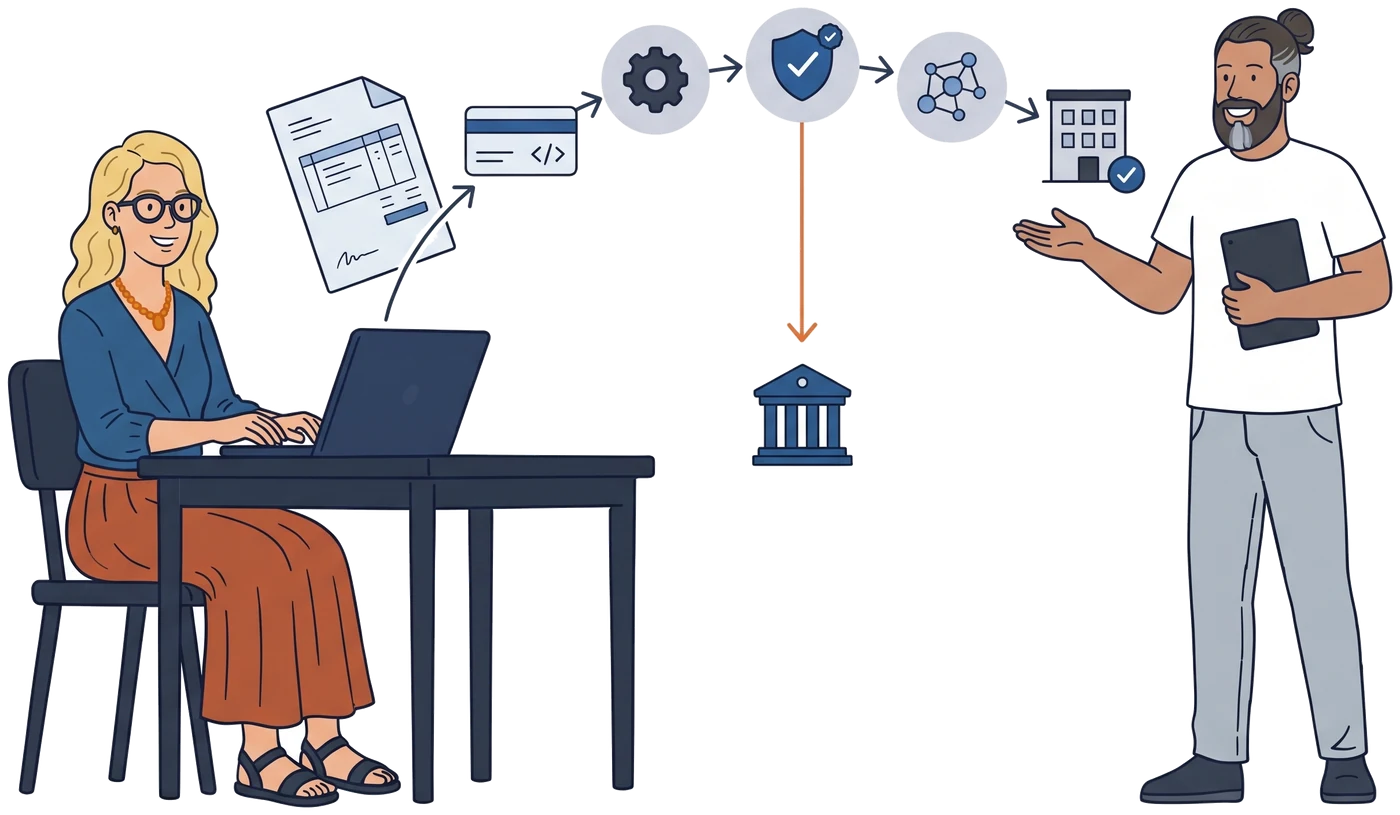
Xeroyou create and sendthe invoice Invoiciconverts it to theUAE format (PINT AE) Casim (ASP)validates and transmits Peppol networkto the buyer’s ASP Your customerreceives it intheir software FTAtax data reported
  1. Xero you create and send the invoice
  2. Invoici converts it to the UAE format (PINT AE)
  3. Casim (ASP) validates it, transmits it and reports tax data to the FTA
  4. Peppol network carries it to the buyer’s ASP
  5. Your customer receives it in their software

An e-invoice is a structured data file, not a PDF. Xero validates the data before anything leaves, and tells you if something is missing.

Setting up Xero e-invoicing in the UAE, step by step

Based on Xero Central’s UAE e-invoicing article. Invoici is pre-live, so Xero says screens and steps may change.

1

Have your tax certificate ready

Your VAT TRN certificate or, if you are not VAT registered, your Corporate Tax certificate. Enter the entire number when asked.

2

Register in Invoici

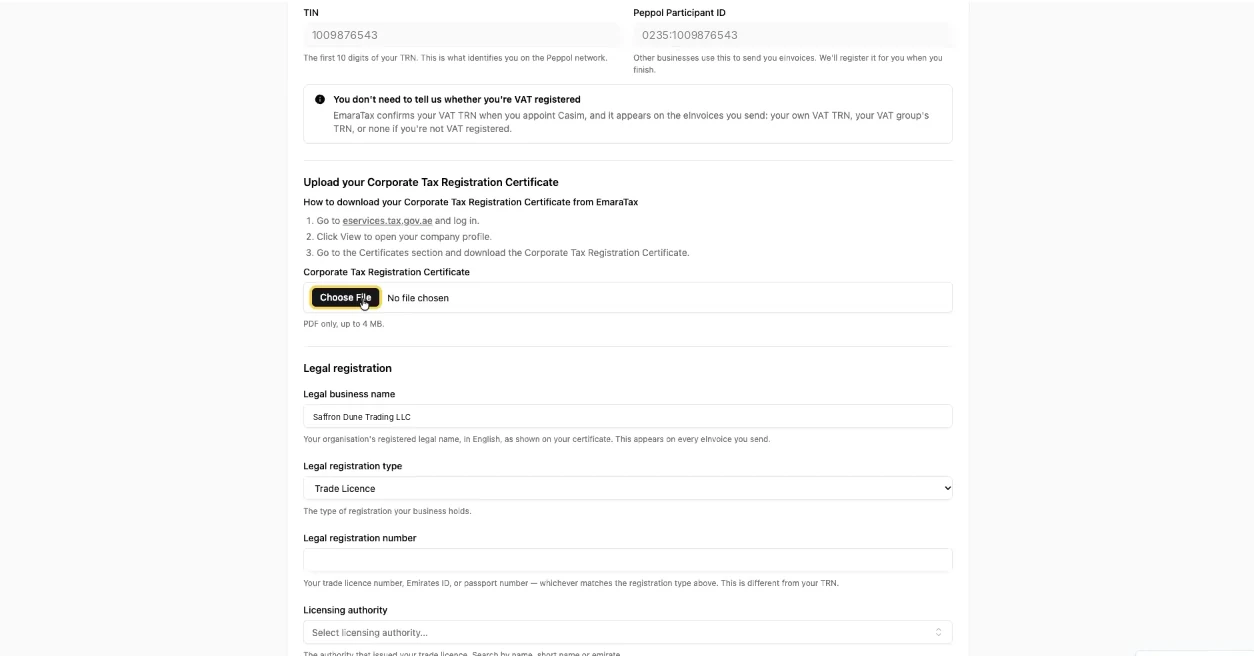
Sign in at uae.invoici.net with your Xero login and connect each Xero organisation. Registration is per organisation.

Invoici registration form showing the TIN, Peppol participant ID, Corporate Tax certificate upload and legal registration fields
Invoici registration, shown with fictitious data.
3

Accept the Casim agreement

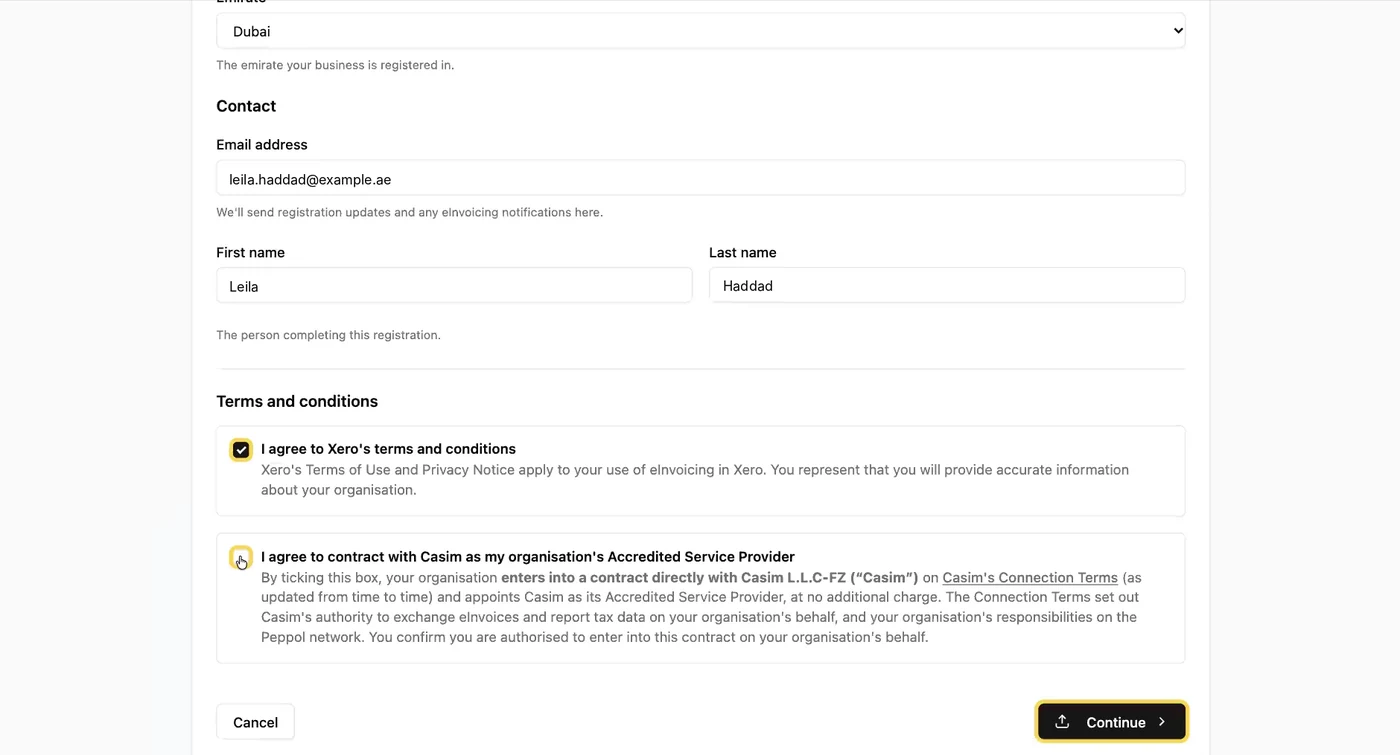
You accept it during Invoici onboarding. This is your contract with Casim as your ASP.

Invoici terms step with the checkbox to contract with Casim as the organisation’s Accredited Service Provider
Accepting the Casim agreement, shown with fictitious data.
4

Map your tax codes

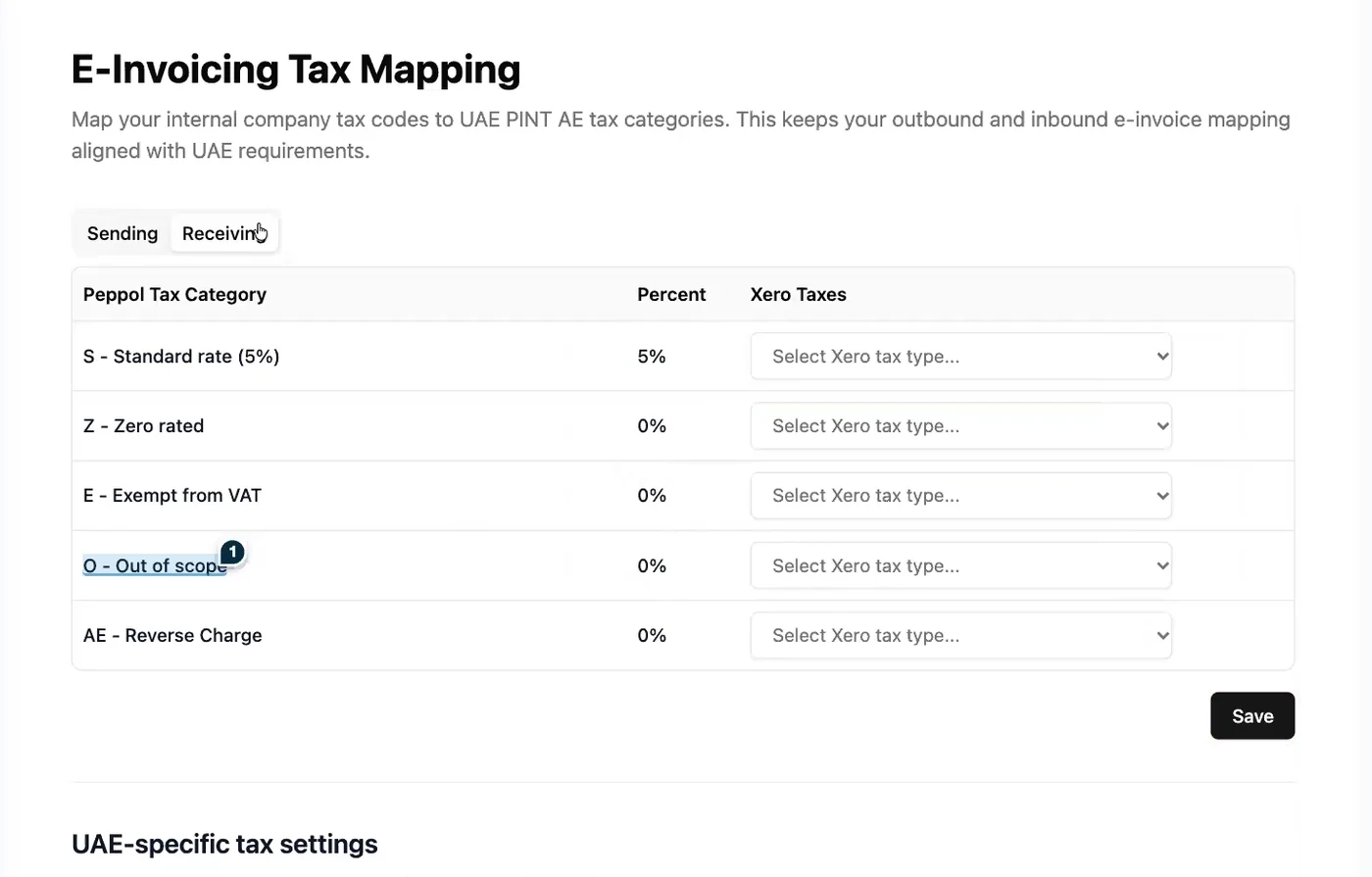
In Invoici, open your business, go to Settings and map each Xero tax rate to an e-invoicing tax category, for sales and for purchases. Set the Profit Margin Scheme rate and the Free Trade Zone default if they apply. You can change the mapping later.

Invoici e-invoicing tax mapping screen matching UAE tax categories to Xero tax rates
Tax code mapping in Invoici, shown with fictitious data.
5

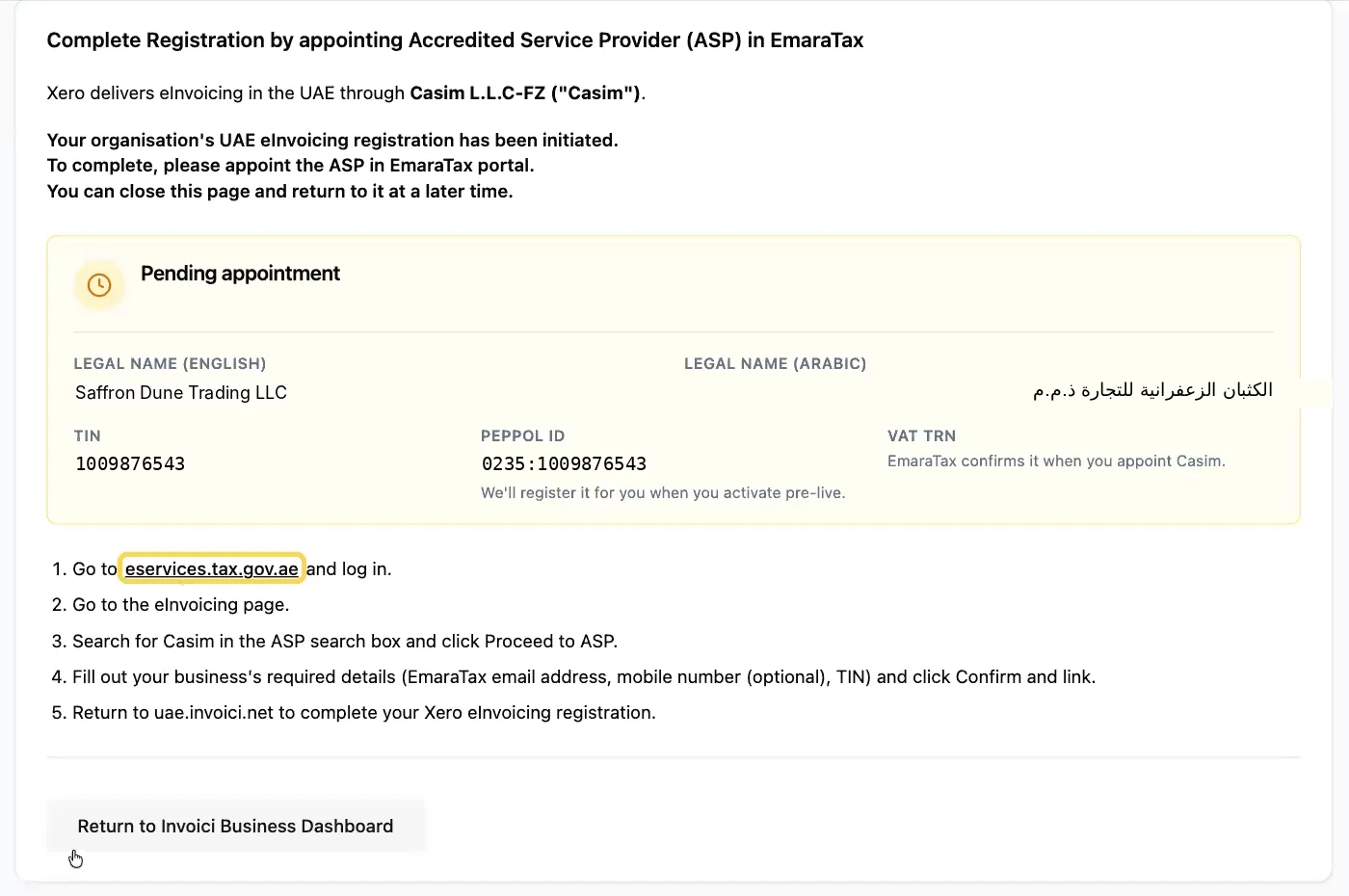
Appoint Casim in EmaraTax

Record Casim as your Accredited Service Provider in EmaraTax before your appointment deadline. Appointing early does not switch on live e-invoicing.

Invoici pending appointment screen with the steps to appoint Casim in EmaraTax
Pending appointment, with the EmaraTax steps, shown with fictitious data.
6

Update your customer records

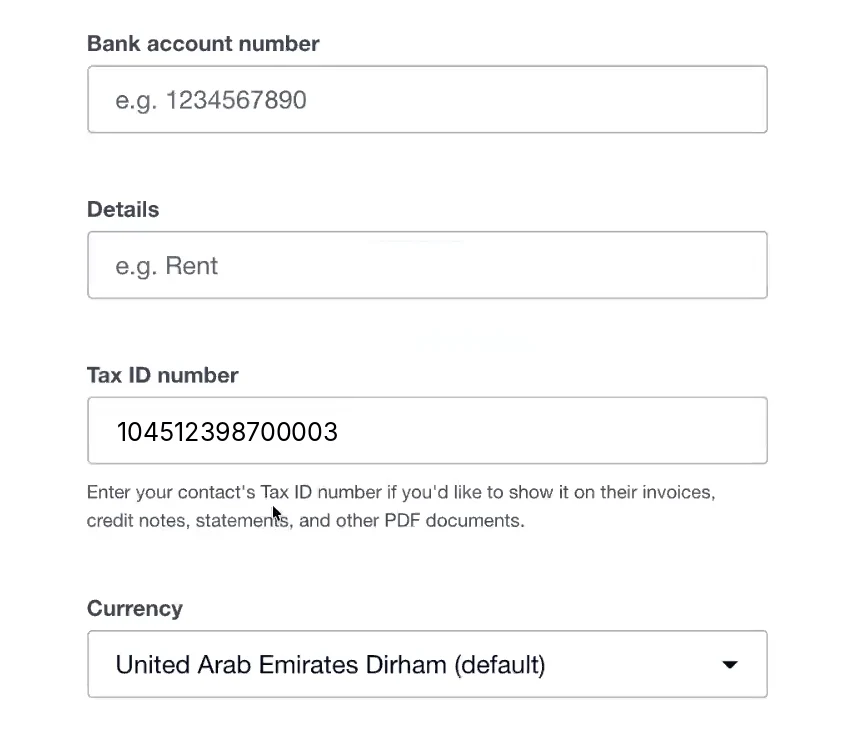
Every customer you invoice needs a complete address, the correct TRN and a business registration number in Xero’s formats. See the checklist below. You can bulk-update contacts by export and import.

Xero contact with the customer’s 15-digit TRN in the Tax ID number field
A customer’s TRN in the Tax ID number field, shown with fictitious data.
7

Flag special transactions

Xero creates an eInvoice Category tracking category when you register. Use it, or set description lines, for e-commerce, continuous supply, summary, free zone and reverse charge invoices.

8

Test, then go live

Send and receive on the Peppol test network now. You need a trading partner registered on the test network to test end to end. When production opens, send every invoice from Xero.

What your customer records need

This is the data most businesses do not have yet. Start collecting it now.

Xero contact fieldWhat to enter
NameThe customer’s legal or trading name
AddressLegal trading address, filled in as the delivery address. Xero cannot send the e-invoice without one. In State / Region, spell the emirate exactly: Abu Dhabi, Dubai, Sharjah, Ajman, Umm Al Quwain, Ras Al Khaimah or Fujairah. Customers outside the UAE still need this field filled in.
Tax ID NumberThe customer’s 15-digit TRN. Where they apply, add flags after a semicolon: ;DEEMED for a deemed supply, ;AGENT:[principal TRN] for agent billing, ;FTZ for a free trade zone override. Example: 100123456700003;DEEMED;FTZ. For a customer outside the UAE, leave it blank: a foreign VAT number stops the e-invoice sending.
Business Registration NumberOne format: trade licence CN-123456;DET (number;licensing authority), Emirates ID EID:[number], passport PAS:[number];[2-letter country code] or Cabinet decision CD:[number]
Which flag applies is a tax decision for your accountant. Getting the format exactly right in Xero is setup work.

Special transactions, sending and receiving

TransactionHow to flag it in Xero
E-commerce saleeInvoice Category tracking 007 - E-commerce on the line
Continuous supply (lease, retainer)Tracking 005 - Continuous Supply on the line
Summary invoiceDescription line [Summary: yyyy-mm-dd, yyyy-mm-dd]
Free zone, beneficiary differs from buyerDescription line [FTZ: beneficiary ID]
Reverse charge lineDescription line Reverse Charge: [Standard Item ID], [Commodity Classification Code]

Sending

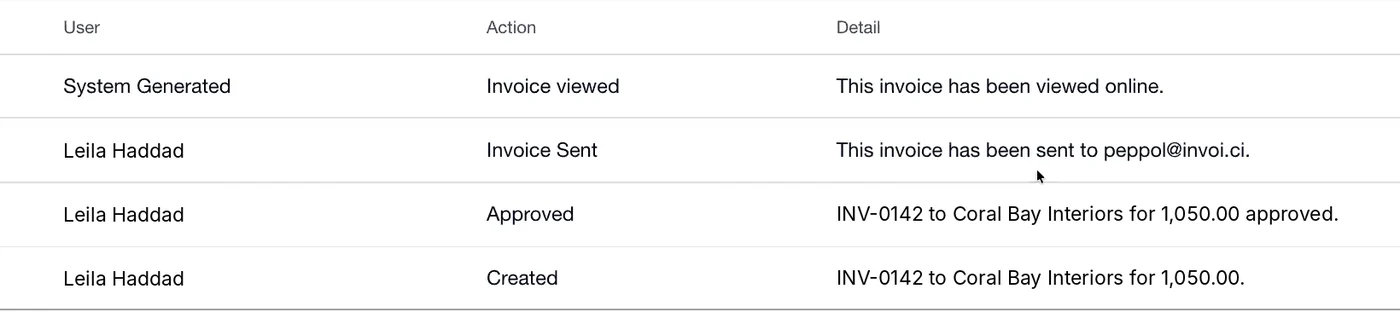
Save [email protected] on the customer’s contact as an additional person included in emails, or add it to the To field in the Send window. Then send from Xero. The invoice history shows the invoice was sent to [email protected].

Xero invoice history showing the invoice was sent to peppol@invoi.ci
Invoice history after sending, shown with fictitious data.

This is the current pre-live process and may change for production.

Receiving

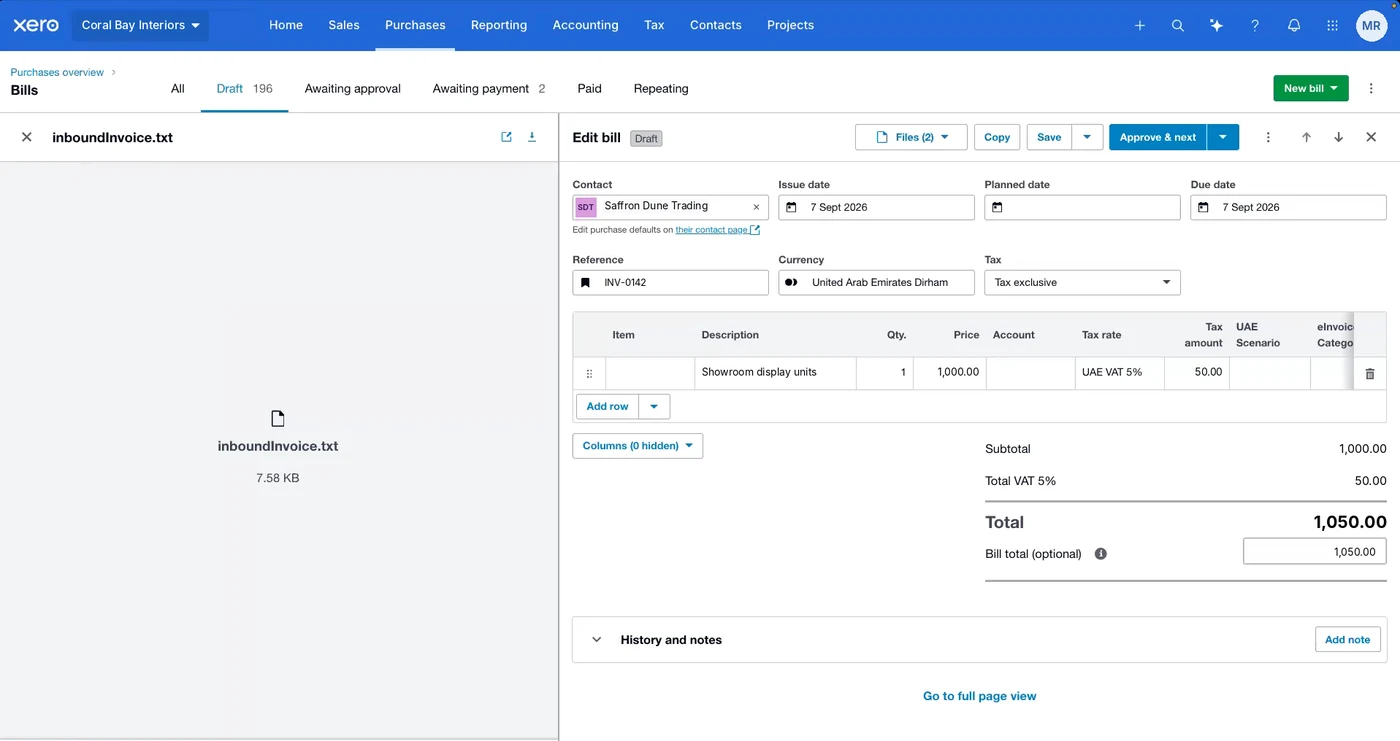
Once registered, supplier e-invoices arrive in Xero as draft bills, whatever software the supplier uses. The original is attached as a .txt file for record keeping. Give suppliers your Peppol ID, shown in Invoici under Business Registration.

A received e-invoice in Xero as a draft bill with the original inboundInvoice.txt file attached
A received e-invoice as a draft bill, shown with fictitious data.

You must be registered to receive, even if your own sending deadline is later.

Mistakes that stop invoices sending

No address on the contact

Xero cannot send the e-invoice. Contact clean-up comes first.

A foreign VAT number in the Tax ID field

For customers outside the UAE the field must be blank, or the e-invoice will not send.

Sending from anywhere but Xero

A PDF emailed from Outlook is not an e-invoice, and invoices raised in Stripe or other tools are not covered unless they are issued from Xero or given their own e-invoicing route.

Customer portals such as DEWA

Outside Xero’s offering. Ask your accountant how portal uploads sit alongside e-invoicing. You may run both processes.

Not registered to receive

You cannot receive e-invoices from suppliers that are already live until you register in Invoici.

Free-text lines in the wrong format

Special transactions rely on description lines in exact formats, and the emirate must be spelt exactly. A small typo is easy to make.

Registered is not the same as ready

Xero and Casim give you the connection. Getting invoices out correctly on day one is the work around it, and it is what Scope does.

What Invoici and Casim give youWhat still needs doing
Registration and your ASP connectionTax codes mapped to e-invoicing categories, for sales and purchases
Conversion to the UAE format and validationCustomer records completed in Xero’s exact formats, and bulk imported
Sending and receiving over PeppolSpecial transaction lines built into templates and repeating invoices
Supplier e-invoices as draft billsReceiving tax mappings and a bill approval routine
Xero product supportTesting with a trading partner, team training and a send procedure
A plan for invoices raised outside Xero and for customer portals

When Xero’s built-in UAE e-invoicing route may not fit

  • Groups, branches or VAT groups: Xero has not yet published how these work
  • Invoices raised outside Xero, from billing tools or e-commerce
  • A USD base currency: Xero says it will be supported, details not yet published
  • Needing a different ASP: possible through an API connection, at extra cost

These are where an Impact Assessment earns its fee.

Why some guides say Xero does not support it

Until October 2026 that was true. Casim was named as Xero’s UAE ASP in mid-October 2026, and Xero now offers UAE e-invoicing through Invoici. Guides written before then are out of date.

We update this page when Xero changes the product. See the log at the bottom.

Xero e-invoicing UAE questions

Does Xero support UAE e-invoicing?

Yes. It is built in through Invoici, with Casim as the Accredited Service Provider. As of 8 November 2026 it runs on the Peppol test network, and Xero says production access will open before the mandate takes effect.

Do we pay extra for Casim?

No. Xero includes it at no additional cost on Starter, Standard and Premium plans.

Do we need to contact Casim?

No. You register in Invoici and accept Casim’s agreement there. Xero has said product questions go to Xero support.

We are not VAT registered. Can we register?

Xero has said you can register with your Corporate Tax registration number and certificate.

Are we done once Casim is appointed?

No. Appointment meets the ASP deadline, but tax mapping, customer records, testing and a new way of sending still need doing.

Can we keep emailing PDFs?

No. Invoices must be sent from Xero to be e-invoices.

Will supplier e-invoices appear in Xero?

Yes, as draft bills, whatever software the supplier uses, once you are registered in Invoici.

Can we see which invoices failed?

Xero has said a status dashboard is coming. Until then, check each invoice’s history for its transmission ID.

Can we use a different ASP with Xero?

Not natively. Another ASP would need its own API connection, at extra cost.

Which phase are we in, and which flag applies?

Those are tax questions for your accountant or the FTA. See the deadlines by revenue.

Update log

  • 8 November 2026: published, checked against Xero Central’s UAE e-invoicing article and Xero’s UAE pages. Invoici is pre-live, on the Peppol test network only.

Get your Xero organisation ready, not just registered

The free Ready Check takes 3 minutes and shows your route and your gaps. Prefer to talk? Pick a time with our Dubai team, the only Xero Ambassador in the UAE.

Get my readiness score